.png&w=64&q=75)
GitHub Slack Integration: How to Connect GitHub to Slack in 2026
Install the official GitHub Slack app, understand where it breaks at team scale, compare the three real ways to send GitHub notifications to Slack, and ship the right setup in under five minutes.
Connect GitHub to Slack in 3 steps
- Install the GitHub app in Slack. In Slack open Apps, search for GitHub and click Add. A workspace admin may need to approve it.
- Link your GitHub account. Run
/github signinin any channel and approve the GitHub OAuth prompt. - Subscribe a channel to a repository. In the channel that should get notifications run
/github subscribe owner/repo pulls reviews comments. Open a pull request to confirm a card arrives.
Full walkthrough with screenshots in the setup section. Teams that outgrow one channel per repo usually switch to a dedicated PR notification tool.
Gabriel Pineda
Founder, PullNotifier
·
Updated October 6, 2026
·
14 min read
Works alongside the official @github bot. Free to start. Setup in under 5 minutes.
Which GitHub Slack integration should you use?
Best for: One team, one channel, issues and PRs mixed. Free.
One message per event, no reviewer mapping, no reminders.
Best for: CI and deploy alerts from your own workflows.
YAML per repo, no review threads, nothing for PR discussion.
Best for: Pull request reviews: one live message per PR, threads, reviewer @mentions, daily reminders.
Pull requests only. Free under 4 developers.
On this page
The basics
What is the GitHub Slack integration?
The GitHub Slack integration is a Slack app, built and maintained by GitHub, that posts repository activity into Slack channels. Pull requests, code reviews, issues, commits, deployments, and releases can all show up as adaptive cards in the channels you pick. You can also run a small set of GitHub commands from Slack, like closing an issue or subscribing a channel to a repo.
You install it once at the Slack workspace level, then run /github subscribe in each channel that wants notifications. The official app is free, supports unlimited users and repos, and works for any GitHub account or organisation on github.com. It is the right starting point for most teams.
Why teams care
Engineers already live in Slack. A working GitHub Slack integration removes the daily context switch between code review, deploy alerts, and team conversation. Done well it shortens PR review time, keeps Dependabot quiet, and gives managers a real view of throughput without nagging the team.
Picking an approach
The 3 ways to send GitHub notifications to Slack
Before any setup, decide which path fits. There are three honest options and they solve different problems. Most mature teams end up running two of them in parallel.
Official @github Slack app
Single team, single repo, single channel. Free.
Pros
Made by GitHub, free forever
Bidirectional /github commands
Two minutes to install
Cons
No routing by label, author, or branch
No reviewer @-mention mapping
Dependabot and bots flood the channel
GitHub Actions → Slack webhook
CI/CD pipeline events. Build, test, deploy.
Pros
Total customisation in YAML
Perfect for build/deploy alerts
Plays well with branch protection
Cons
One-way only
YAML drift across repos
Not designed for PR review workflows
PullNotifier (and similar third-party apps)
Multi-team setups, code review at scale, GHES.
Pros
Per-channel routing by repo, label, author, branch
Reviewer username → Slack handle mapping
Daily PR digest and smart reminders
Cons
Paid above the free tier
One more app to install
GitHub → Slack: comparing the 3 ways side-by-side
A walkthrough of the official @github app, GitHub Actions Slack notifications, and PullNotifier: what each one does, where each breaks, and which one to pick.
Step-by-step
How to set up the official GitHub Slack app
Six steps. None of them takes more than a minute on a normal account. The whole flow is under 5 minutes if an org admin is on hand to approve access. Credit to the Nira walkthrough by Marie Prokopets for one of the clearest visual guides on the official flow.
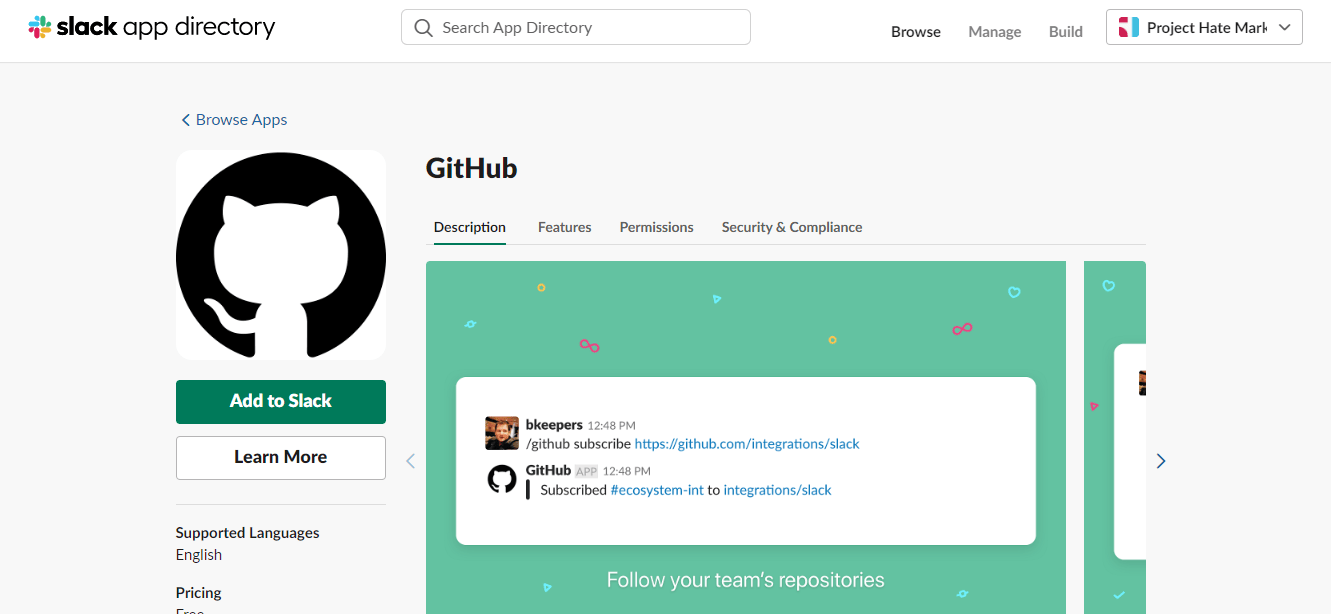
Install the GitHub app in Slack
In Slack, click Apps, search for "GitHub", and install. Slack will ask for permission to add the bot to your workspace. You only need workspace admin rights to install at the workspace level.
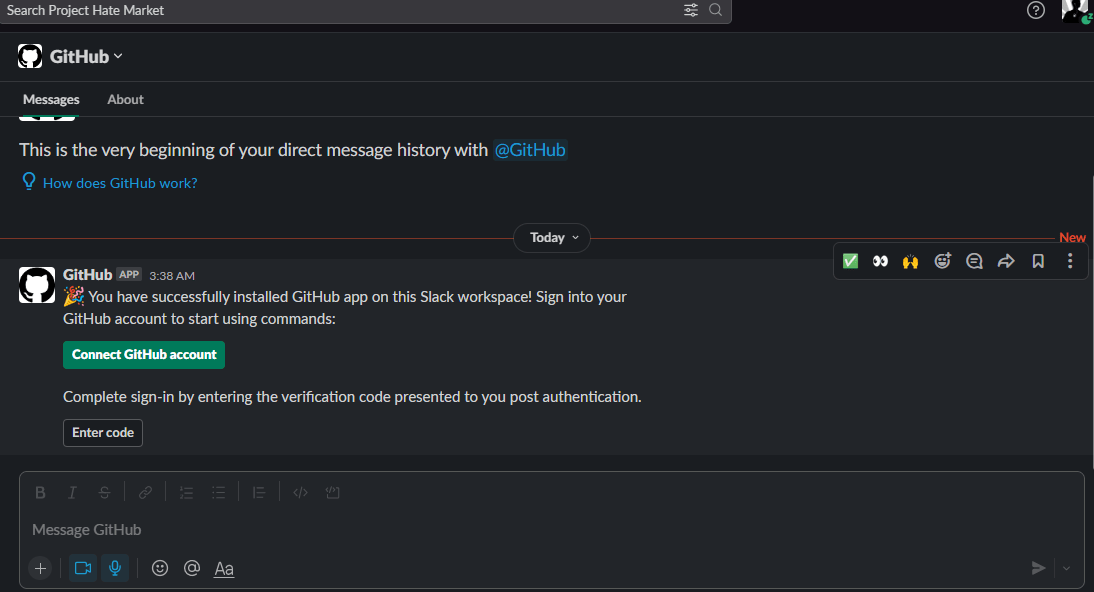
Connect your GitHub account
Run /github signin in any Slack channel. The bot opens a browser tab to authenticate with GitHub OAuth. Approve the requested scopes (repo read, org read) so the bot can subscribe on your behalf.
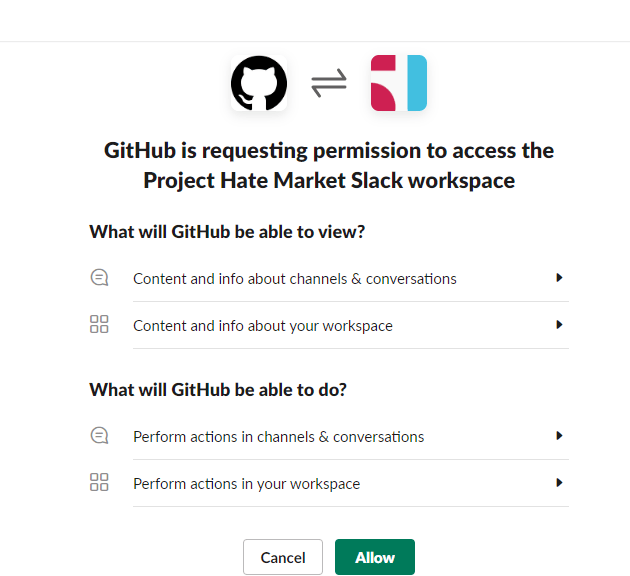
Authorise the org or repo
If your repos sit inside a GitHub organisation, an org admin needs to grant the integration access. The bot will return a link the first time you try to subscribe to a private repo.
Subscribe a channel to a repo
From the channel where you want notifications, run /github subscribe owner/repo. By default you will get pull requests, issues, deployments, releases, commits to the default branch, and review activity.
Trim the default subscription
Most teams end up firehosed. Cut what you do not need with /github unsubscribe owner/repo issues, commits, deployments, statuses. Keep pulls and reviews if your goal is code review.
Verify a test event
Open a draft pull request on the connected repo, then convert it to ready for review. You should see a card appear in the Slack channel within a few seconds. If nothing arrives, jump to the troubleshooting section below.
Configure the official GitHub Slack app, end to end
Install, sign in, authorise the org, subscribe a channel, trim the firehose, and verify a test event, recorded against a real Slack workspace.
Reference
/github command reference
The commands every team ends up using. Paste them into Slack from the channel you want to configure.
| Command | What it does |
|---|---|
/github signin | Link your GitHub user to your Slack identity |
/github subscribe owner/repo | Subscribe the current channel to a repo with the default event set |
/github subscribe owner/repo reviews comments | Add review and comment events on top of the defaults |
/github unsubscribe owner/repo issues commits | Quiet the noisier event types |
/github subscribe owner/repo +label:"needs review" | Filter to a single label so a channel only sees PRs that match |
/github subscribe owner/repo branches:"main,release/*" | Restrict commit notifications to specific branches |
/github subscribe list | Show every subscription in the current channel |
/github unsubscribe owner/repo | Remove all subscriptions for that repo from this channel |
/github close [issue link] | Close an issue without leaving Slack |
/github open [issue link] | Reopen an issue from Slack |
/github help | Full command reference |
Sharing
Sharing GitHub links: rich previews and unfurls
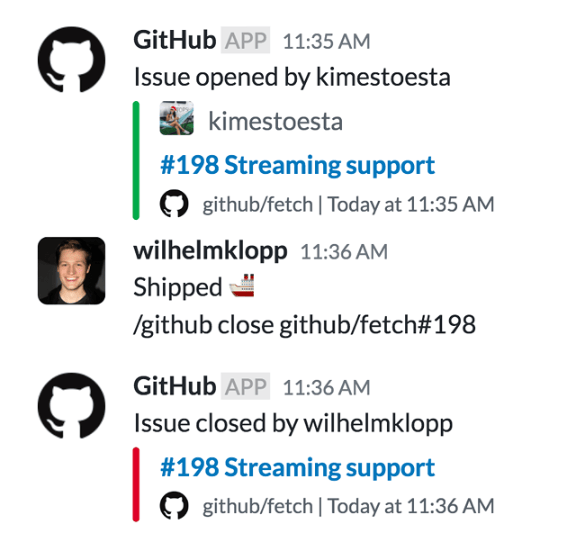
Once @github is installed in your workspace, pasting any github.com URL into a Slack message produces a rich preview. Pull request links show the title, description, status checks, and reviewers. Issue links show the title, labels, and assignees. Commit links show the diff stats and author. Code permalinks (a file URL with line numbers) show a syntax-highlighted snippet right in the channel.
For private repos, every Slack user who wants to see previews needs to run /github signin at least once. Otherwise they see a generic “sign in to preview” placeholder. This is the most common reason link previews look broken to some users and not others on the same team.
Power move: the integration lets you close, reopen, and comment on issues directly from the preview card without leaving Slack. Combined with the slash commands above, this covers most of what a triage rotation needs day-to-day.
The honest gaps
Where the official app falls short
The official app is fine for a single team in a single channel. The moment a second team, a second channel, or a second repo enters the picture, the same six problems show up. This is the gap PullNotifier was built to fill.
One firehose per channel
The official app subscribes a channel to a repo as a whole. You cannot route the frontend repo to the frontend channel and the platform repo to the platform channel unless you re-run /github subscribe in each. There is no rule based routing.
Reviewers do not get @-mentioned
When a card lands in Slack, the assigned reviewer sees their GitHub username as plain text. There is no mapping to Slack handles, so notifications get missed and review times stretch.
No filtering for bots or drafts
Every Dependabot bump, every Renovate PR, every draft PR shows up. You can unsubscribe from comments and deployments, but you cannot say "ignore everything from dependabot[bot]".
No daily digest
Standups end up turning into "what PRs are open?" because there is no summary view. The official app pushes events, never state.
Rigid reminders
/github subscribe required-reviewers fires a reminder on every PR with a pending review, every day. There is no smart cadence based on PR age, reviewer load, or labels.
Personal notifications are coarse
You either get DM-ed on everything that mentions you or nothing. Per-event filters live at the channel level, not the user level.
When it breaks
Troubleshooting common issues
The same six problems come up in support tickets and forum posts. Quick fixes below. For the deeper write-up on the most common one, see fix GitHub Slack notifications not sending.
Check three things in order. First, run /github subscribe list in the channel to confirm the subscription is registered. Second, open the repo settings on GitHub, go to Integrations, and confirm the Slack app shows as installed. Third, on private repos, an org owner needs to approve the GitHub app from the org settings page. If all three are good, post a draft PR and toggle it ready for review to force an event.
The usual cause is an OAuth refresh failing because the GitHub user who installed the app left the org or rotated their token. Run /github signin to re-authenticate. If the install itself was removed at the org level, an admin needs to reinstall the GitHub app and re-run the subscriptions.
The official app does not map GitHub usernames to Slack handles. There is no fix from inside the app. Either ask each reviewer to mute the channel and rely on personal feeds, or move to a third-party tool with user mapping.
You cannot filter by author with the official app. The workaround is /github unsubscribe owner/repo and re-subscribe with only the specific event types you care about. Most teams keep pulls and reviews and drop commits and statuses. A more permanent fix needs a third-party tool that supports author and label rules.
Slack treats unarchived channels as new for app installs. Re-add the GitHub app to the channel with /invite @github, then run /github subscribe again.
Only if you self-host the open source Slack app from github/slack-bot inside your network. The hosted app at slack.com only talks to github.com. Most GHES customers either self-host or pick a third-party tool that supports GHES as a managed service.
Different tool, different job
GitHub Slack integration vs GitHub Actions Slack notifications
The first time most teams reach for GitHub Actions to post into Slack, it is because they want something the official app cannot do: a notification on a green CI run, a heads-up when a deploy finishes, a ping when a release tag is cut. The official @github bot ignores all of those because it listens to repository events, not workflow events.
The trade is honest. With Actions you write a YAML step, you control exactly when it fires, you can template the message with any variable in the workflow. The cost is that the YAML lives inside each repository, drifts as the workflow changes, and needs a maintained Slack bot token in repo secrets. Most teams end up running the official app for code review events and a small Actions step for pipeline events. Use the right tool for each.
Here is the minimal step that gets a deploy notification into Slack using the official slackapi/slack-github-action:
name: Notify Slack on deploy
on:
  push:
    branches: [main]

jobs:
  notify:
    runs-on: ubuntu-latest
    steps:
      - uses: slackapi/slack-github-action@v1
        with:
          channel-id: 'C0123456789'
          slack-message: |
            :rocket: `${{ github.actor }}` shipped
            `${{ github.event.head_commit.message }}` to prod.
        env:
          SLACK_BOT_TOKEN: ${{ secrets.SLACK_BOT_TOKEN }}
Want the YAML with retry handling, channel routing per environment, and a failure variant? Full copy-pasteable version with notes is in our blog post on using GitHub Actions to send Slack notifications.
And the table view, for the side-by-side decision:
| Aspect | GitHub Slack integration | GitHub Actions notification |
|---|---|---|
| Trigger model | Event-driven on the repo (PRs, reviews, issues) | Triggered from a workflow step you write in YAML |
| Direction | Bidirectional, supports /github commands from Slack | One-way, Slack only receives |
| Setup | /github subscribe in a channel | YAML step with a Slack webhook or action |
| Best for | Code review, PR triage, issue management | Build, test, deploy, release pipeline events |
| Customisation | Filter by event type only (per channel) | Anything you can write in YAML or a script |
| Maintenance | No code to keep up to date | YAML lives in each repo, drifts as the workflow changes |
Send Slack notifications from a GitHub Actions workflow
A working YAML example for posting build, test, and deploy results to a Slack channel using the slackapi/slack-github-action.
Want the YAML in copy-pasteable form? The full breakdown is in our blog post on using GitHub Actions to send Slack notifications.
The PullNotifier story
What PullNotifier is, and why we built it
PullNotifier is a Slack and Microsoft Teams app for GitHub pull request notifications. It plugs into the same GitHub events the official @github bot listens to, then adds the layer most engineering teams reach for on day three: per-channel routing, reviewer @-mentions that actually ping, filters that mute Dependabot, a daily PR digest, and Slack pull request reminders for PRs going stale.
We built it because we kept watching the same thing happen at every team we worked with. The official @github bot would get installed in #engineering on a Monday. By Friday, half the team had muted the channel. Reviews stalled because nobody got pinged, draft PRs lit up the channel, and Dependabot drowned out the human work. Adding emoji reactions to PR notifs to track who had approved became a team ritual. The official app pushes events; what teams actually need is a notification system that understands code review as a workflow.
Three years and 30+ G2 reviews later, PullNotifier runs in over 1,000 organisations and reaches roughly 30,000 engineers across Slack and Microsoft Teams. Free for small teams, paid for teams past the free tier, used the same way regardless.
Here is what PullNotifier looks like in your Slack workspace - team channel notifications, the daily digest, and personal DMs, all in one place.

What you get out of the box
Six things the official app does not do, that show up in every onboarding call we have ever taken.
Smart, scoped PR cards
Cards update in place as the PR moves through draft, review, changes requested, and merged. No new card every event.
Per-channel routing
Route by repo, label, author, or branch. The frontend repo goes to #frontend-prs, the API to #api-prs, hotfixes get their own thread.
Reviewer @-mentions that work
Bulk-import the GitHub ↔ Slack mapping or let us auto-match. Reviewers actually get pinged instead of seeing their username as plain text.
Filter Dependabot and drafts
Per-author and per-label rules so bot PRs and drafts stay out of the channel until they need a human.
Daily PR digest
A configurable morning summary of every open PR and its blocker. Standups get shorter, stale PRs get unstuck.
GitHub Enterprise Server
Supported as a managed integration, including air-gapped setups behind a proxy. Regulated teams stay regulated.
Install it in two clicks
Connect Slack first, then GitHub. Five-minute setup, free for up to four users. The official @github bot can keep running alongside.
“We used to add emojis on PR notifs to indicate it was approved lol. This app takes out that manual process and truly makes PR notifications in Slack seamless.”
Chris
Senior Backend Engineer · G2 verified review
Side by side
PullNotifier vs the official @github bot
No spin. The features that matter for teams running more than one channel.
| Feature | PullNotifier | Official @github |
|---|---|---|
| Pull request notifications in Slack | Smart, scoped cards | Basic event cards |
| Per-channel routing by repo, label, author, or branch | Yes | One firehose per channel |
| GitHub username to Slack handle mapping | Bulk import + auto match | Reviewers do not get pinged |
| Noise filtering (drafts, bots, Dependabot, Renovate) | Per author and per label rules | All or nothing per event type |
| Daily PR digest for standups | Configurable cadence | Not available |
| Smart code review reminders | Per reviewer, per PR age | /github subscribe required-reviewers only |
| Personal DM notifications with per-event filters | Yes | Coarse personal feed only |
| In-place card updates as the PR changes | Yes | Yes |
| GitHub Enterprise Server support | Yes, including air-gapped | Self-hosted Slack app required |
| Setup time | Under 5 minutes | 10 to 20 minutes per repo |
| Pricing | Free for small teams | Free |
Set up PullNotifier in under 5 minutes
Install the Slack app, connect GitHub, map reviewer handles, and route the first repo to the right channel.
When the official GitHub app is the right call
We are not saying replace it on day one. The official @github bot is the right pick when:
You have one engineering team, one channel, one repo, and a free tool is good enough.
You want the /github subscribe and /github help administrative commands and nothing more.
You only need issue notifications, not PR review workflows.
You cannot install third-party Slack apps because of compliance rules.
Self-hosted
GitHub Enterprise Server and Slack
GitHub Enterprise Server (GHES) runs in your own network. The hosted Slack app at slack.com only talks to github.com, so it cannot reach a GHES instance behind a VPN or a private subnet. Two options:
Option 1: Self-host the open source Slack bot
Clone github/slack-bot, expose a webhook endpoint reachable from your GHES instance, and run the bot on infrastructure you control. Free, but you maintain it. Reviewer mapping, smart routing, digests, and reminders are still missing.
Option 2: Use a managed integration that supports GHES
PullNotifier supports GHES as a managed integration, including air-gapped setups where outbound traffic from GHES has to go through a proxy. You get routing, filtering, and reminder features the self-hosted bot does not include. Most regulated teams pick this path - see the GitHub Enterprise Server Slack integration page for deployment options.
Background on the platform itself is in our blog post GitHub Enterprise Server explained.
Listicle
Best GitHub Slack integration tools in 2026
A short version of the full listicle. For pros, cons, screenshots, and the long-form pricing breakdown, read the full guide to the best GitHub Slack integrations.
Smart PR notifications with channel routing, reviewer mapping, and a daily digest. The pick for teams past one channel.
Free for up to 4 users. Pro from $29/mo for 10 users.
Free and made by GitHub. Best when one team uses one channel and you accept a noisy default subscription.
Free.
Creates a temporary Slack channel per PR. Great if your team likes per-PR threads, painful if you already have channel sprawl.
Free tier, paid from $8 to $16 per user per month.
DM-first notifications with analytics on review throughput. Good for engineering managers, less for channel-based teams.
Starter at $39/mo for 10 users.
Get the most from it
Best practices for a GitHub Slack integration that scales
The same six habits separate teams whose Slack stays useful from teams whose channels become unread red badges.
Scope notifications by role
Engineers get PRs and reviews; managers get the daily digest; security gets dependency and deploy events. One channel, one purpose.
Use a dedicated channel per repo or per team
Mixing five repos into #engineering becomes a place no one reads. Route the frontend repo into #frontend-prs and the API into #api-prs.
Map GitHub handles to Slack handles
Without user mapping, "review requested from @octocat" is plain text and nobody gets pinged. This is the single biggest reason reviews stall.
Mute bots, keep humans
Dependabot, Renovate, and your own CI bot do not need a card every time they bump a patch version. Filter by author so humans surface.
Run a daily digest
A morning summary of every open PR and its blocker beats reading 200 event cards from the day before. Standups get shorter.
Audit subscriptions quarterly
Channels get archived, repos get deprecated, teams reshuffle. Run /github subscribe list every quarter and prune the dead subscriptions.
Quick answers
Frequently asked questions
What teams ask before they pick an integration.
The GitHub Slack integration is a Slack app, made by GitHub, that posts repository events (pull requests, issues, reviews, deployments) into Slack channels. You install it once per Slack workspace and subscribe each channel to the repos it cares about with /github subscribe.
Yes. The official app from GitHub is free for unlimited users and repositories. Most third-party alternatives that add routing and filtering are free for small teams and charge per user above a threshold.
Install the GitHub app from the Slack App Directory, run /github signin in any channel to link your GitHub account, then run /github subscribe owner/repo in the channel that should receive notifications. Full step-by-step with command reference is in the setup section above.
The official app posts events into channels but does not map GitHub usernames to Slack handles. Reviewers see their username as plain text and never get a real Slack ping. Tools like PullNotifier add user mapping so reviewer notifications actually trigger.
Yes, by running /github subscribe owner/repo separately in each target channel. The official app does not support more granular rules (per label, per author, per branch). For that, you need a third-party integration.
Not directly through the hosted Slack app, which only talks to github.com. For GHES you either self-host the open source Slack bot from the github/slack repository, or use a third-party tool like PullNotifier that supports GHES as a managed integration including air-gapped setups.
Three ways. The official GitHub app: install it from the Slack App Directory, run /github signin, then /github subscribe owner/repo in a channel. GitHub Actions: add a slackapi/slack-github-action step that posts to a webhook. PullNotifier: sign in with GitHub, pick repos and a channel, and pull request notifications start in under five minutes with threads, reviewer mentions and reminders.
With the official app, run /github subscribe owner/repo pulls reviews comments in the channel. Every PR event then posts as a separate message. If you want one message per PR that updates in place, a thread for its comments and approvals, reviewer @mentions and a daily reminder of PRs still waiting, use PullNotifier, which is built only for pull requests.
In the channel, run /github subscribe owner/repo. Add feature names to control what posts, for example /github subscribe owner/repo pulls reviews, and /github unsubscribe owner/repo issues to stop issue noise. /github subscribe list shows what the channel is subscribed to. The full command reference is on this page.
Not from the official GitHub app, which only posts events as they happen. PullNotifier sends a daily Slack digest of every open PR that is stale or missing approvals and @mentions the reviewers who can move it. See the Slack PR reminders page for how it works.
The GitHub Slack integration is event-driven and bidirectional. It posts updates and accepts commands like /github close. GitHub Actions Slack notifications are workflow-driven. You write a YAML step that calls a Slack webhook when a build succeeds or fails. Use the integration for review and discussion events, use Actions for CI/CD pipeline events.
For most engineering teams, PullNotifier is the best fit because it adds routing, reviewer mapping, filtering, and a daily digest on top of the basics the official app covers. For a single team in a single channel, the official GitHub app is enough. See the listicle for a full breakdown.
Set up the GitHub Slack integration the way teams actually want it
Install PullNotifier alongside the official @github bot, compare them in your own workspace, keep the one your team picks. Free for up to 4 users, paid plans for larger teams.
Gabriel Pineda
Founder of PullNotifier. Writing about code review, async engineering, and the boring infrastructure between GitHub and Slack that nobody wants to maintain.